
Tax invoices and simplified tax invoices
Issue tax invoices for businesses and simplified tax invoices for individual customers — every e-invoice in a structured format, ready to send.
Approved by the Zakat, Tax and Customs Authority
Compliant with Phase 2 requirements
Haseem is e-invoicing and accounting software that issues ZATCA-compliant e-invoices — tax invoices for businesses and simplified tax invoices for individuals — in a structured format. Issue the e-invoice, send it to your customer, and it posts straight to your accounts — no technical complexity.
Billed annually (588 /year)
All prices are VAT excluded
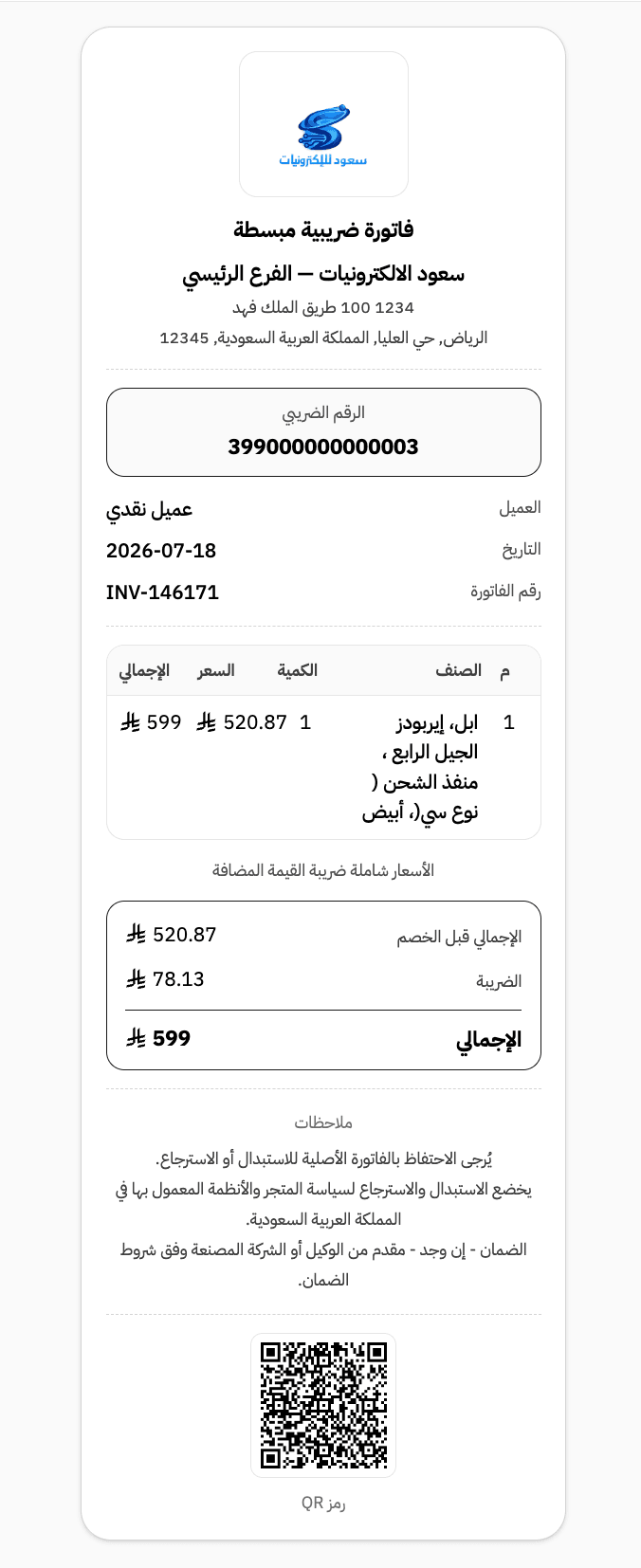
Every sales invoice you issue from Haseem shows its state: issued, paid, unpaid, or cancelled. And under Phase 2, you see the submission status with the Zakat, Tax and Customs Authority (ZATCA) directly — sending, pending, or accepted.
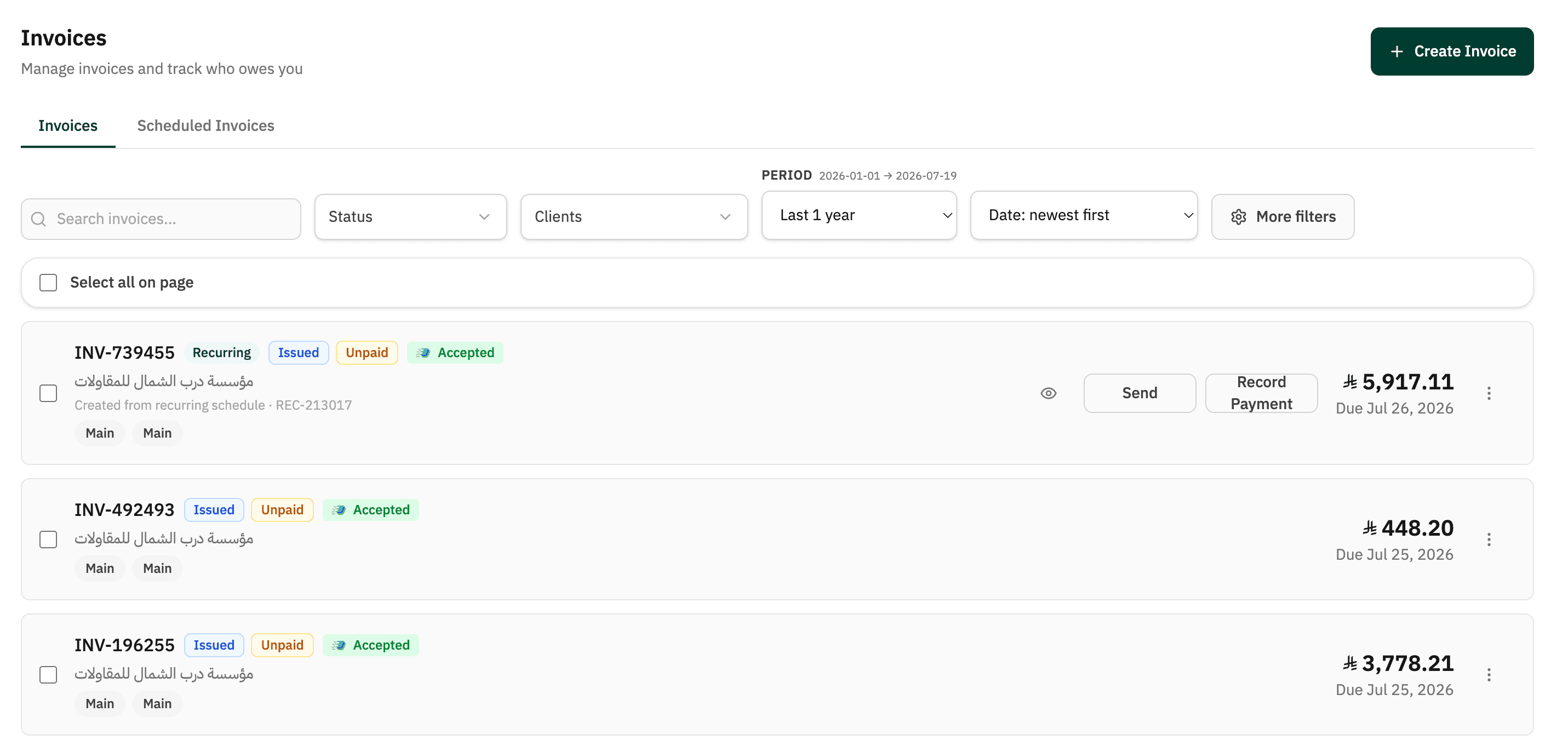
Issue tax invoices for businesses and simplified tax invoices for individual customers — every e-invoice in a structured format, ready to send.
Compliant with Phase 1 (the Generation Phase) and Phase 2 (the Integration Phase) requirements via the Fatoora platform.
A QR code is added to every e-invoice automatically, per ZATCA requirements — no extra setup.
Item-level VAT rates (15%) calculated automatically on every invoice.
Every invoice shows its state — paid, unpaid, or cancelled — along with its submission status on the Fatoora platform.
Each sales invoice connects to its customer and receipt voucher in one place. On the Essential plan, convert a quotation to an invoice directly.
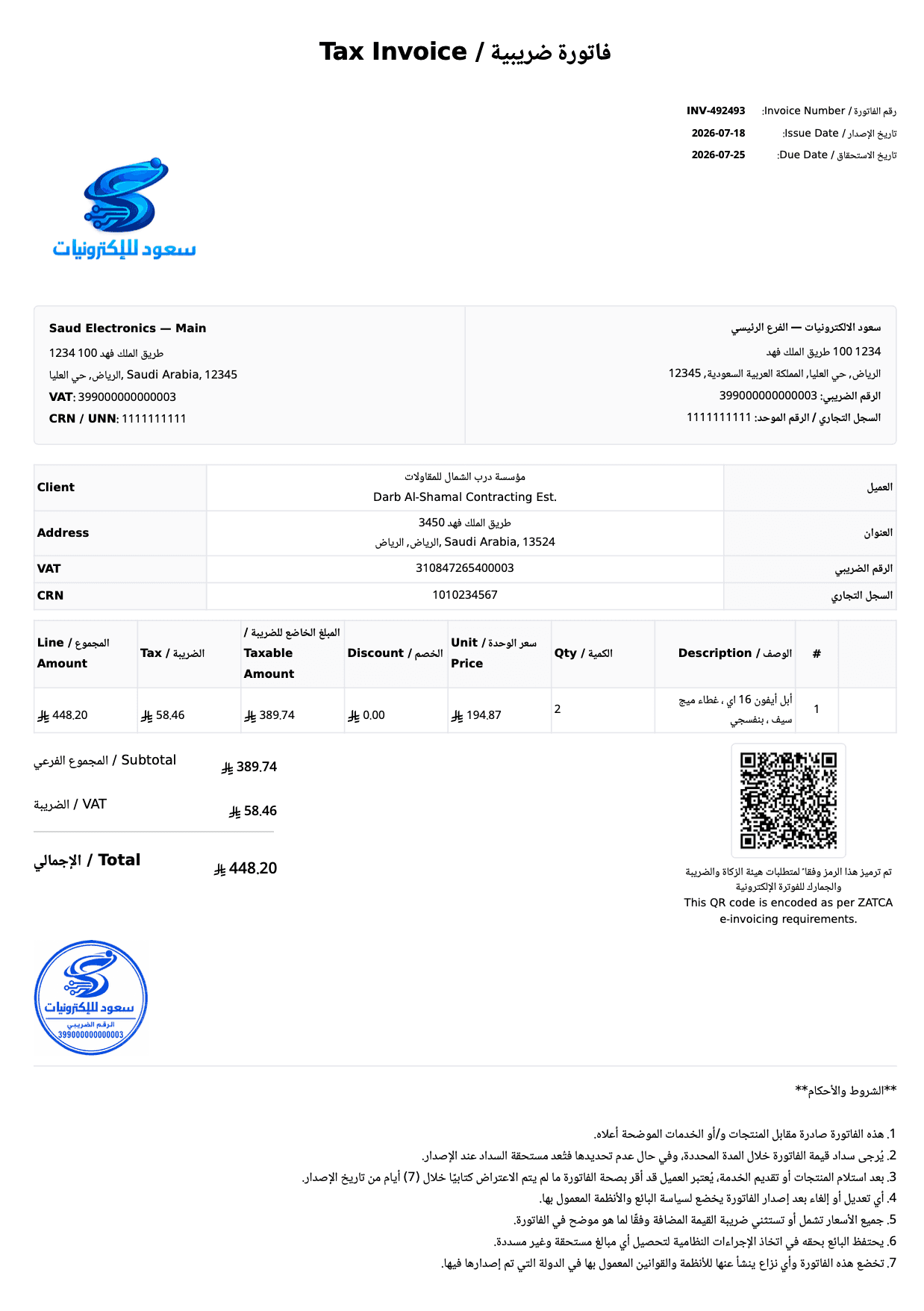
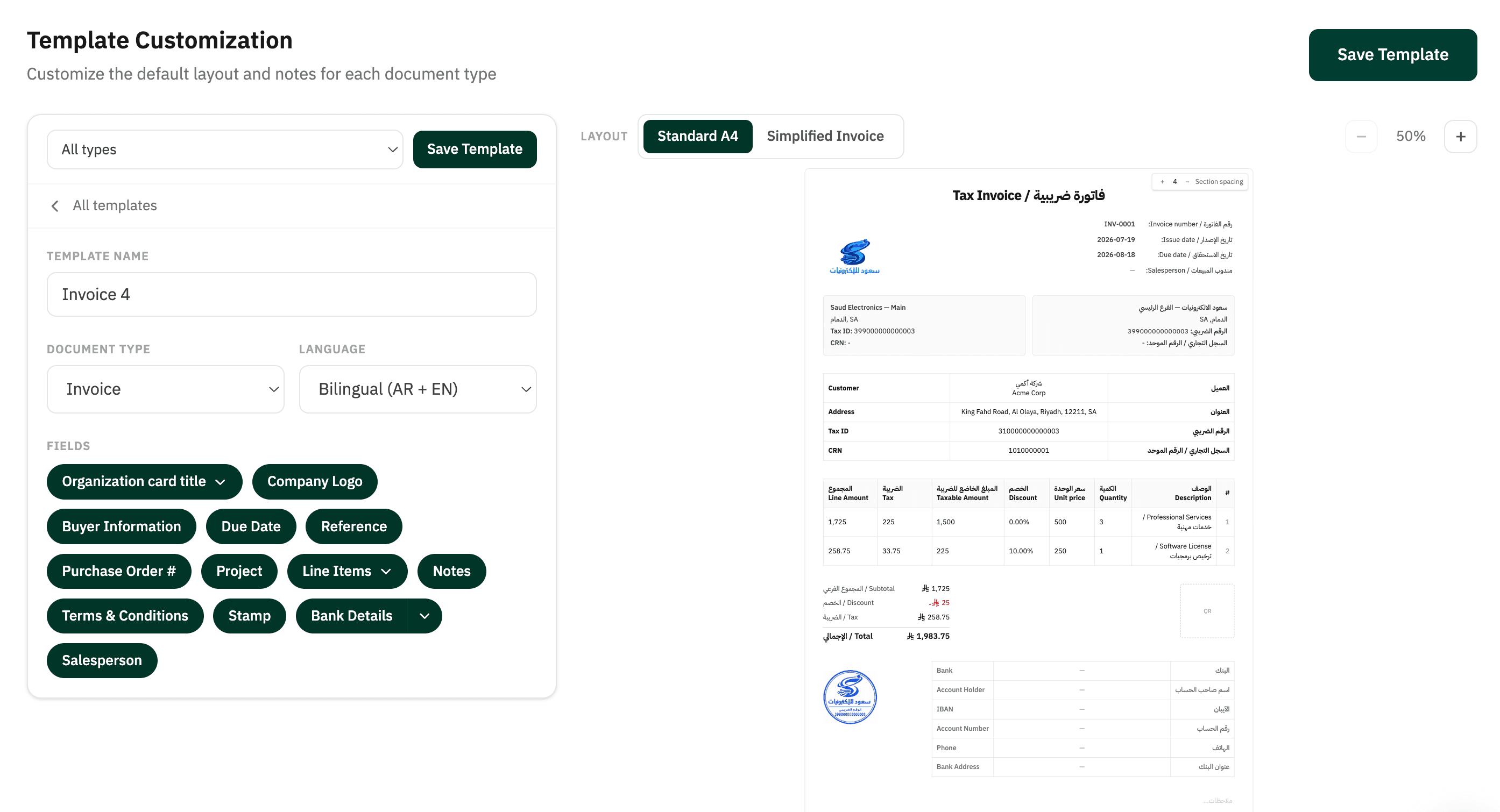
Your logo appears on every tax invoice. Add terms and conditions and your stamp once in template settings — they appear automatically on every invoice.
Download the tax invoice as a PDF, ready to send to your customer or print, with all mandatory fields and the QR code.
Arabic and English in the same document, with the mandatory fields kept in Arabic as ZATCA requires.
Watch how an e-invoice is issued from Haseem
Every tax invoice Haseem issues — whether a sales invoice for a business or a simplified invoice from the point of sale — includes the fields required by ZATCA:
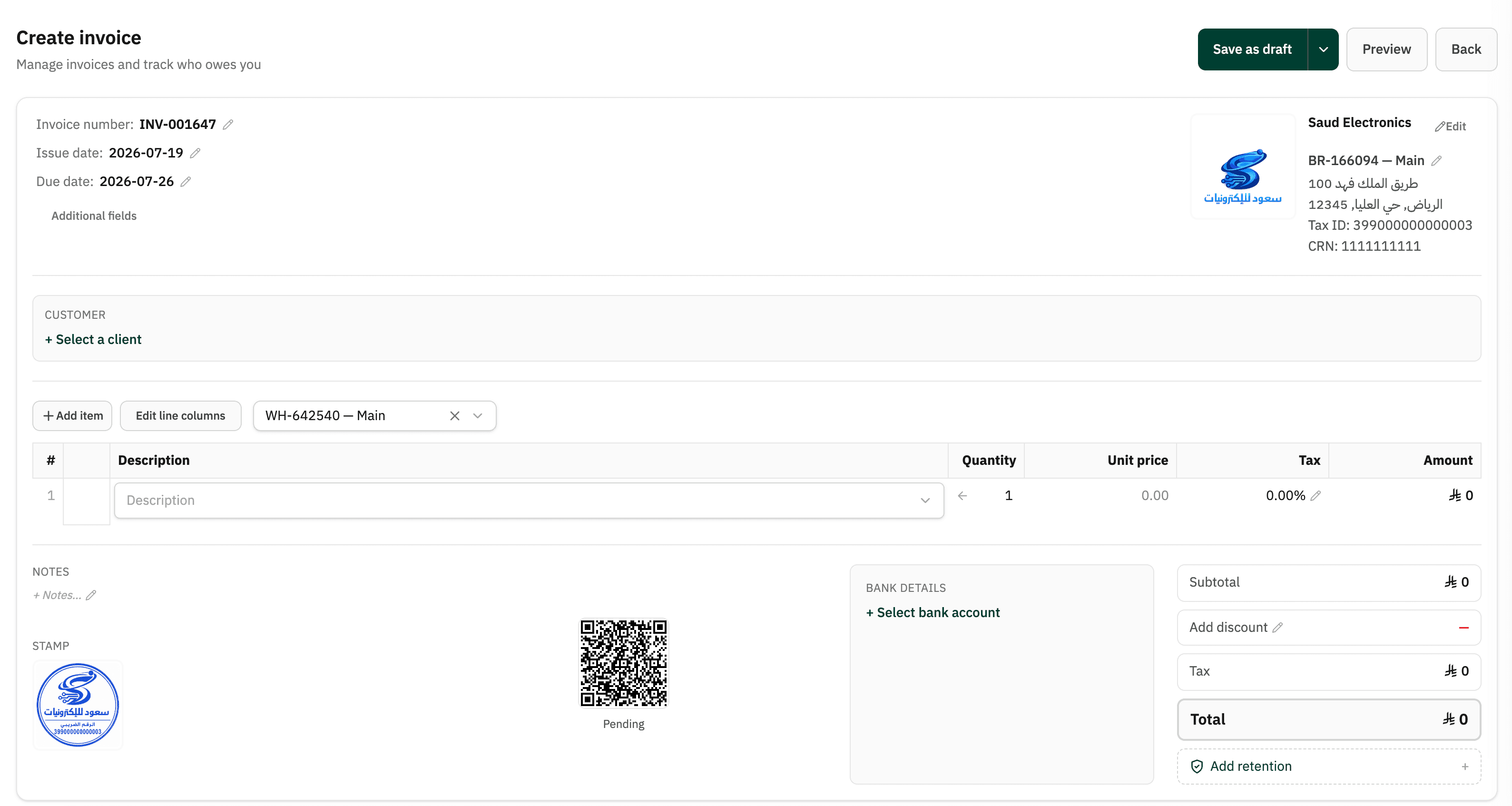
Haseem issues tax invoices for businesses (B2B) and simplified tax invoices for individuals (B2C) — every e-invoice carries a QR code and the mandatory fields, ready for the Fatoora platform.
Issued to VAT-registered businesses and entities, with the buyer's details and tax number. Under Phase 2, Haseem submits it for clearance via the Fatoora platform, and you see its status on the invoices screen — sending, pending, or accepted by ZATCA — before it reaches your customer.
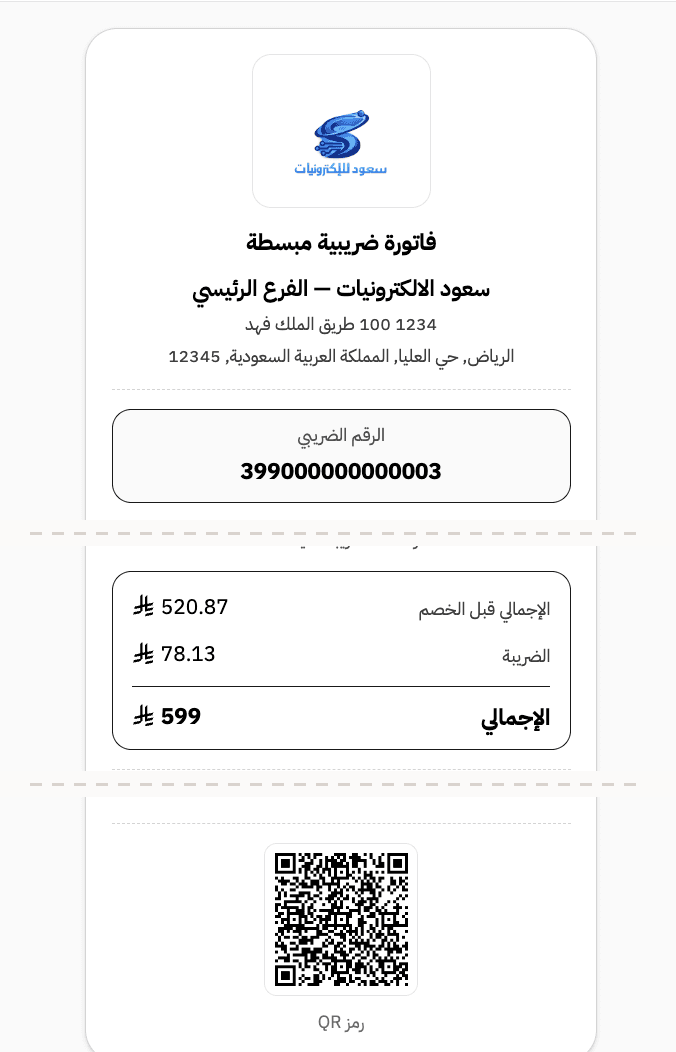
Issued to individual customers straight from the point of sale, and reported to ZATCA within 24 hours of issue. It prints with your logo and your return-policy notes, and counts toward the plan's monthly invoice allowance.
Both types carry a QR code and every mandatory field — the same compliance, from the same software, with no extra setup.
Haseem lets you customize the template for sales invoices, quotations, and proforma invoices to fit your business — your company logo, terms and conditions, and bank details, all in one place.
An e-invoice is an invoice issued, stored, and exchanged in a structured electronic format, containing the data and fields required by ZATCA. E-invoicing in Saudi Arabia covers two invoice types:
Issued to VAT-registered businesses. Under Phase 2 it goes through clearance via the Fatoora platform before being sent to the customer.
Issued to individual customers at the point of sale, and reported to ZATCA within 24 hours of issue.
Issuing tax invoices and simplified tax invoices is available on every Haseem plan. The difference between plans is the monthly limits, not the compliance.
| Feature | Invoicing | Essential | Complete |
|---|---|---|---|
| Monthly price with annual billing | 49 | 59 | 109 |
| Sales | |||
| E-invoicing (Phase 1) | ✓ | ✓ | ✓ |
| E-invoicing (Phase 2) | ✓ | ✓ | ✓ |
| Invoicing | 50 | 300 | Unlimited |
| Quotations & Proforma Invoices | — | ✓ | ✓ |
| Customer contacts | 50 | 100 | Unlimited |
| Invoice & quote templates | 1 | 2 | Unlimited |
| PDF download | ✓ | ✓ | ✓ |
| Credit notes | ✓ | ✓ | ✓ |
| Stamps on invoices & quotes | — | ✓ | ✓ |
| Purchases | |||
| Purchase orders | — | ✓ | ✓ |
| Bills | — | ✓ | ✓ |
| Debit notes | — | ✓ | ✓ |
| Expense Tracking | — | ✓ | ✓ |
| Supplier contacts | — | 100 | Unlimited |
| Accounting | |||
| Project profitability | — | ✓ | ✓ |
| Cost centers | — | ✓ | ✓ |
| Multi-currency | — | — | — |
| Account Reconciliation | — | ✓ | ✓ |
| Manual journal entries | — | ✓ | ✓ |
| Apply tax rates | ✓ | ✓ | ✓ |
| Cash, bank accounts & cards | 2 | 4 | Unlimited |
| Reports | |||
| Sales report | ✓ | ✓ | ✓ |
| Expense report | ✓ | ✓ | ✓ |
| VAT Return Report | — | ✓ | ✓ |
| Cash flow report | ✓ | ✓ | ✓ |
| Inventory | |||
| Inventory adjustments | — | ✓ | ✓ |
| Inventory reports | — | ✓ | ✓ |
| Team and system | |||
| Users, Roles & Permissions | — | ✓ | ✓ |
| Users, Roles & Permissions | 1 | 2 | 5 |
| Branches | 1 | 2 | 5 |
| API access | — | — | ✓ |
| Cashier (POS) | ✓ | ✓ | ✓ |
Simplified invoices issued through the POS count toward the plan's monthly invoice allowance. If you run a retail business with high invoice volumes, Complete gives you unlimited invoices. Prices exclude VAT.
Haseem is e-invoicing and accounting software compliant with Phase 2 requirements — tax invoices go through clearance and simplified invoices through reporting via the Fatoora platform.
Yes. Haseem issues e-invoices that meet ZATCA requirements — tax invoices for businesses and simplified tax invoices for individual customers, for both Phase 1 and Phase 2.
A tax invoice is issued to VAT-registered businesses and entities (B2B) and goes through clearance via the Fatoora platform before being sent to the customer. A simplified tax invoice is issued to individual customers (B2C) at the point of sale and is reported to ZATCA within 24 hours of issue.
Yes. Haseem supports Phase 2 (the integration phase) via the Fatoora platform — clearance for tax invoices and reporting for simplified invoices, depending on the invoice type.
It depends on the plan: 50 invoices on Invoicing, 300 on Essential, and unlimited on Complete. Simplified invoices issued through the POS count toward the plan's monthly invoice allowance.
Yes. A QR code is added automatically to every tax invoice Haseem issues, with no extra setup.
Yes. Haseem lets you customize the invoice template — show or hide sections such as the logo, terms and conditions, stamp, and salesperson, with support for bilingual invoices (Arabic + English). The number of templates depends on the plan: one on Invoicing, two on Essential, unlimited on Complete.
Yes. Haseem supports bilingual tax invoices (Arabic + English) in the same document, with the mandatory fields kept in Arabic as ZATCA requires.
Yes. Upload your company logo in template settings and it appears automatically on every sales invoice, quotation, and proforma invoice you issue.
Yes. Write your terms and conditions once in template settings, and they appear automatically at the bottom of every tax invoice you issue — no retyping.
In Haseem, every sales invoice is an e-invoice — a compliant tax invoice. Every sales invoice you issue automatically includes the mandatory fields and QR code, and is ready for submission via the Fatoora platform — not just an internal document.
Prices exclude VAT, which is added as required.
Sign up now and issue your first compliant invoice within minutes. No credit card. No complexity.