
Quotations & proforma invoices — from a price quote to a compliant invoice
Create a quotation or proforma invoice in Arabic and English, send it to your customer as a PDF, track it through to approval, and convert it in one step into a Phase-2 compliant tax invoice — inside the same software that runs your accounting and inventory.
- 14-day trial, no credit card
- Bilingual — Arabic and English
- Convert to a Phase-2 compliant invoice
From a price quote to a compliant invoice — in one click
An accepted quote needs no re-entry. Convert it into a Phase-2 compliant tax invoice and it posts straight to your accounts.
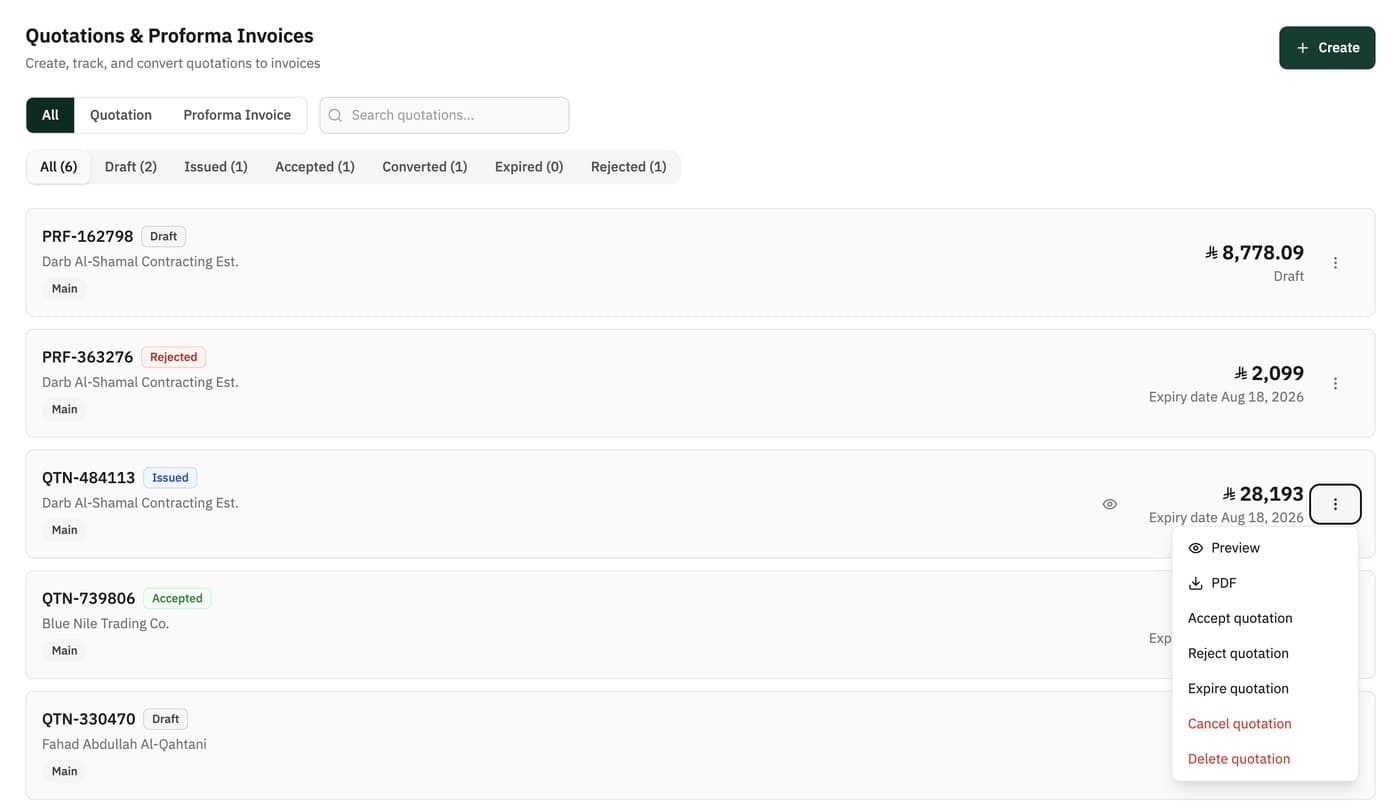
Every quotation and proforma in one place — filter by type (quotation / proforma) and status, and accept, reject or export a PDF in one click.
Create the document in a minute
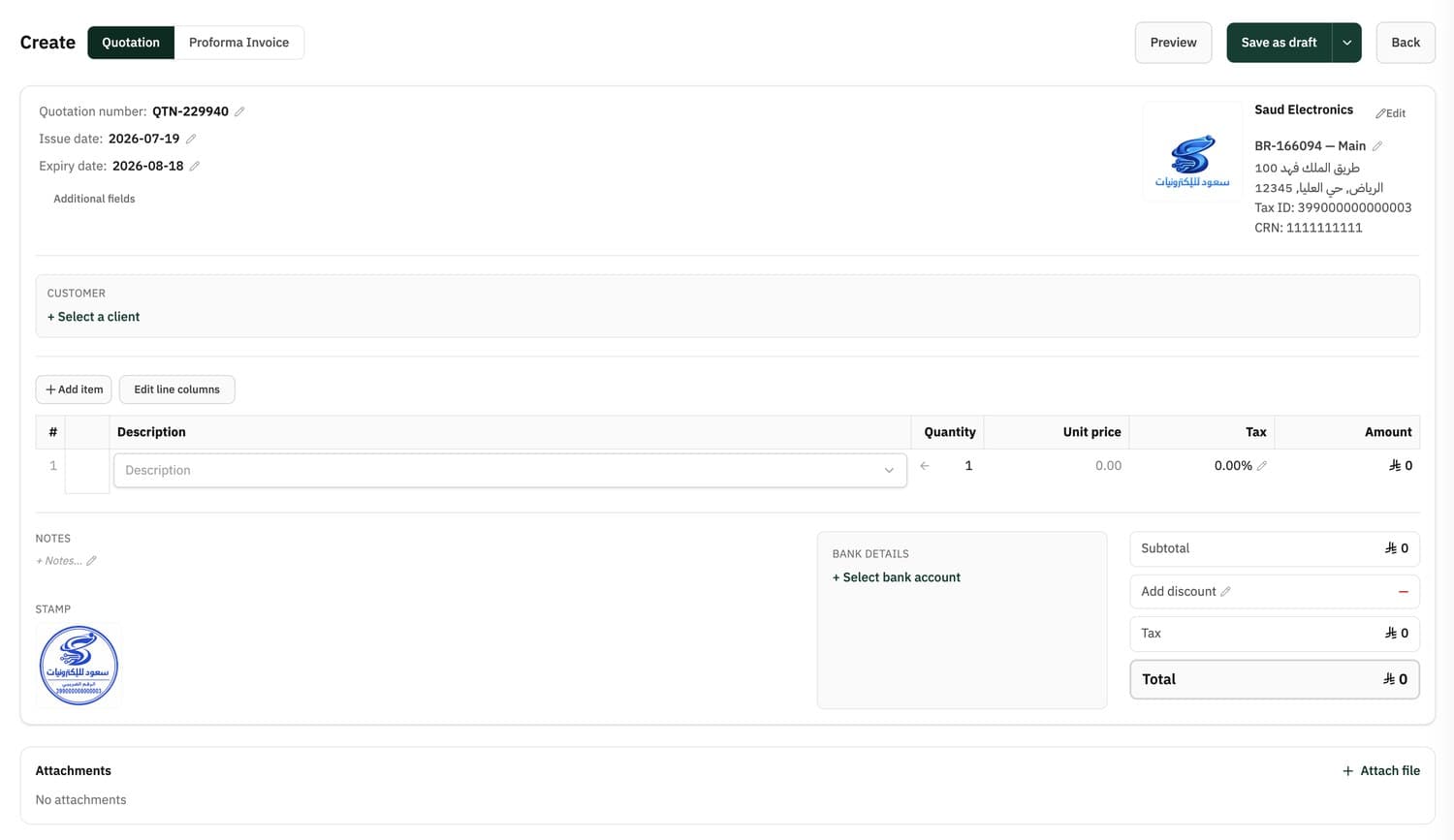
Create a quotation or proforma invoice from the same screen — switch the type at the top, add an item- or invoice-level discount, with stamp, bank details and attachments.
- Switch between a quotation template and a proforma invoice template at the top
- Discount on a line or the whole invoice, with tax calculated automatically
- Stamp, bank details and attachments on the document
- Automatic numbering, issue date and expiry date
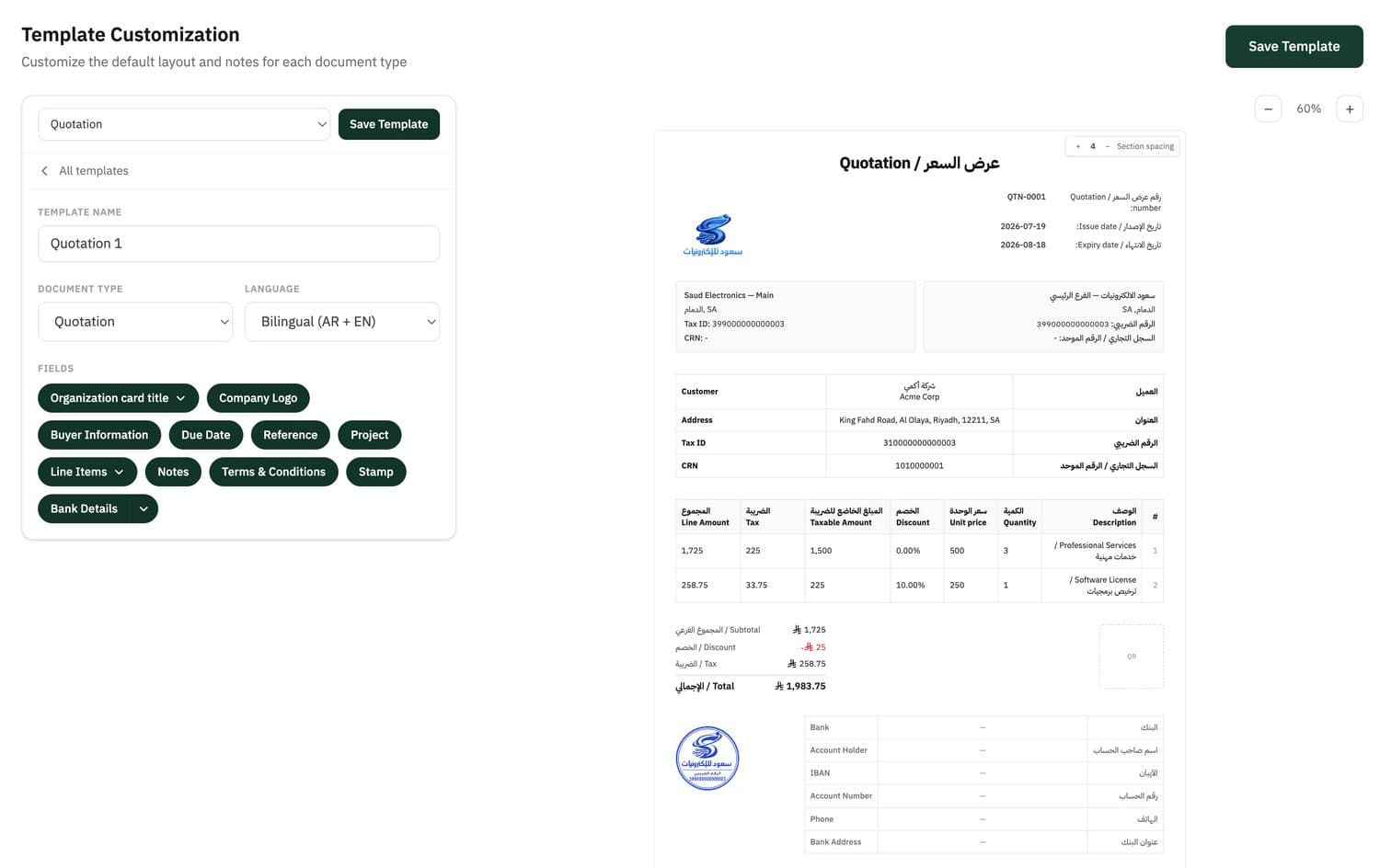
Quotation template and proforma invoice template — fully under your control
A bilingual (Arabic + English) template for each document type — toggle the fields you want and save it ready for every time.
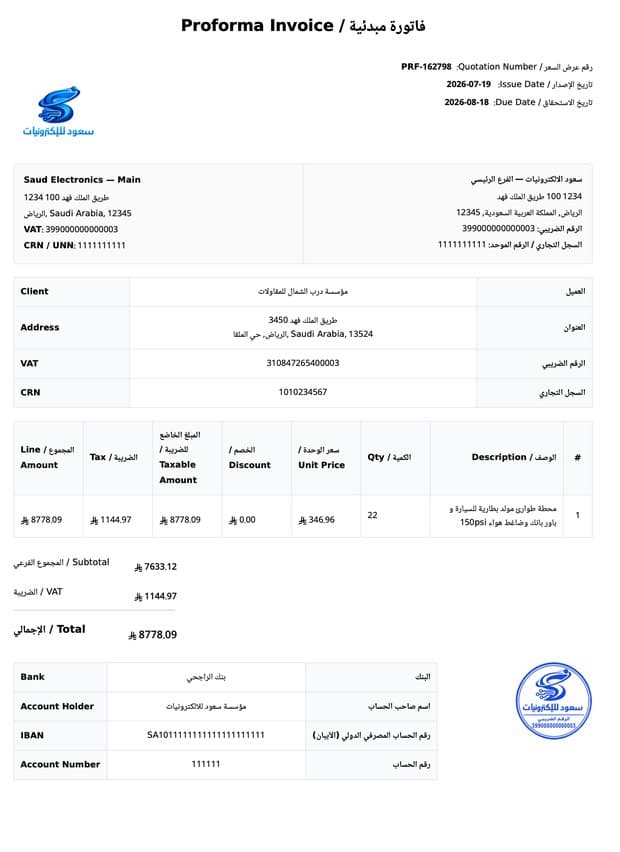
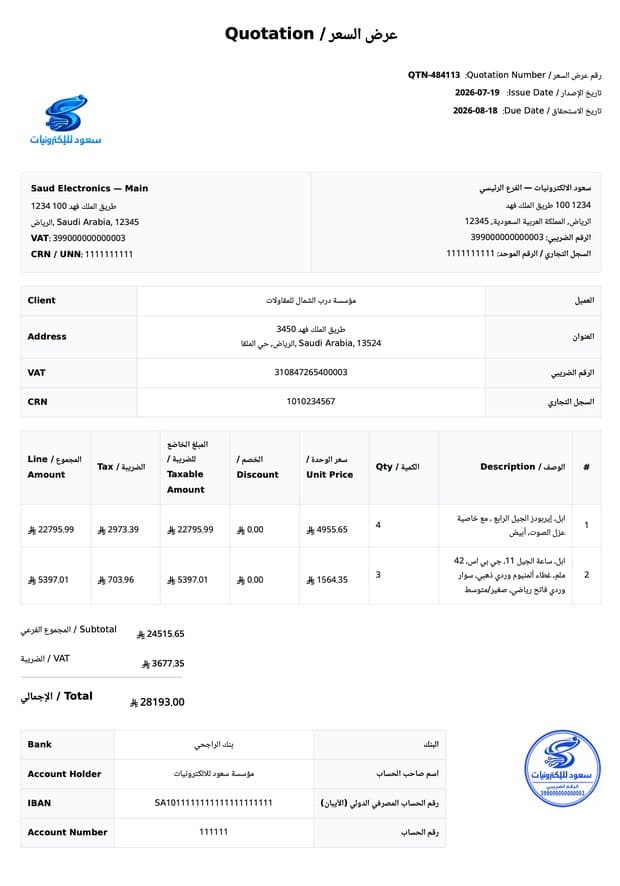
Quotation and proforma invoice — professional and ready to send
Whether you issue a quotation or a proforma invoice, the document comes out clean in Arabic and English, with your logo, stamp and bank details — ready to export as a PDF and send to your customer.
- Arabic and English side by side in one document
- Your logo, stamp and bank account details
- Clear line items, discount, tax and total
- Automatic numbering — QTN for quotations, PRF for proforma invoices
- Export to PDF in one click
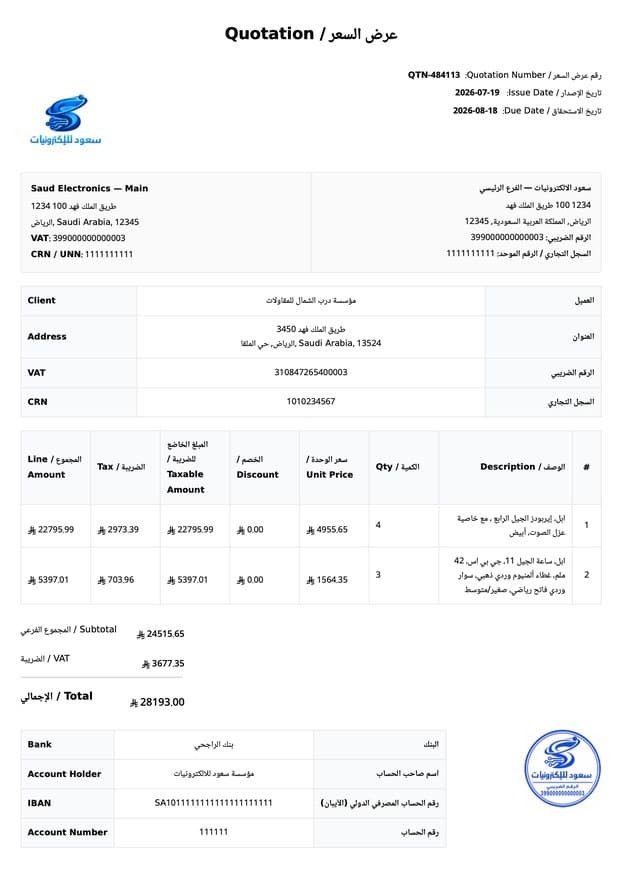
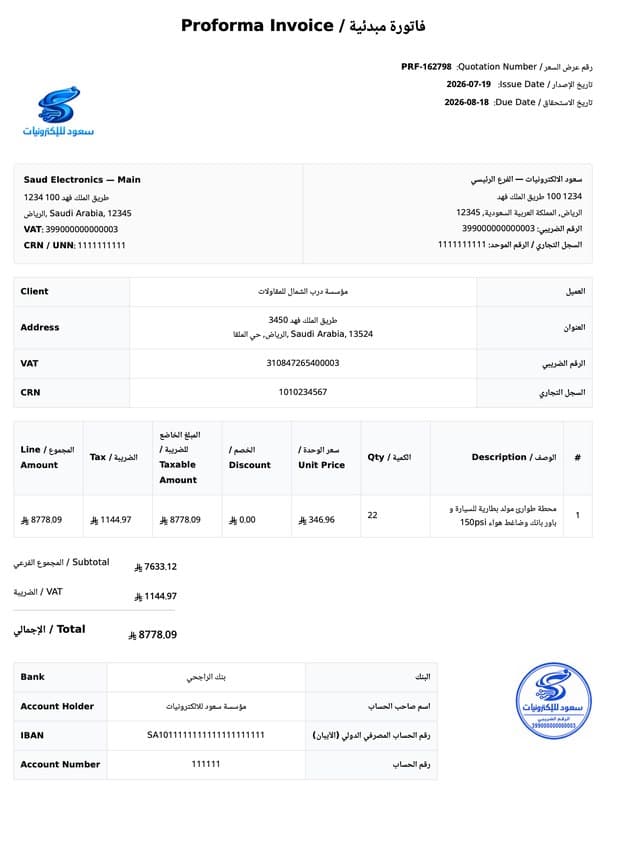
Quotation, proforma invoice, and tax invoice
Three different documents — each with its moment. Haseem covers them all.
| Document | When you use it | Tax document? |
|---|---|---|
| Quotation | Before the sale — you present prices and terms to the customer, pending their approval. | No |
| Proforma invoice | An early, formal document stating the expected amount before payment or for the customer's internal steps. | No |
| Tax invoice | After approval and sale — the official record of the sale. In Haseem it is produced by converting the accepted quote. | Yes — compliant with Phase-2 requirements |
What a professional quote includes
- Your business details, VAT number and logo
- Customer details and a quote reference
- Document number, issue date and expiry date
- Clear line items: description, quantity, unit price
- Discount, tax and total, calculated correctly
- Terms and conditions, and bank details
- A stamp for a formal finish
Choose your plan — quotations from Essential
Every plan includes Phase-1 and Phase-2 compliant e-invoicing. Quotations and proforma invoices start from the Essential plan.
Annual billing gives you a lower monthly cost — up to 35% off.
Invoicing
billed annually (588 /yr)
For getting started, and staying compliant from day one.
Phase 2 + inventory + one point of sale
- 1 user, 1 branch
- 1 warehouse, 1 point of sale
- Sales, expense, and cash-flow reports
Essential
billed annually (708 /yr)
For growing businesses that want a clearer grip on invoices and finances.
Phase 2 + inventory + points of sale
- 2 users, 2 branches, 2 warehouses, 2 points of sale
- Full accounting, purchases, and financial statements
- Cost centres, project profitability, and retention holds
- Recurring invoices
Business
billed annually (1,308 /yr)
For scaling operations — more teams, more branches, and more points of sale.
Phase 2 + inventory + 5 points of sale
- 5 users, 5 branches, 5 warehouses
- 5 points of sale, unlimited invoices
- Everything in Essential
- Extra points of sale available as a paid add-on
All prices exclude VAT
See all features and limits →Questions about quotations & proforma invoices
What's the difference between a quotation, a proforma invoice, and a tax invoice?
A quotation is a pre-sale document where you present prices and terms, pending the customer's approval. A proforma invoice is an early, formal document stating the expected amount before payment. A tax invoice is the official record of the sale after approval — in Haseem it is produced by converting the accepted quote, and it is compliant with Phase-2 requirements.
Can I convert a quotation into an invoice?
Yes. An accepted quote converts in one click into a Phase-2 compliant tax invoice that posts straight to your accounts. The resulting invoice is an ordinary sales invoice and counts toward your plan's monthly invoice allowance.
Are quotations and proforma invoices bilingual?
Yes. You can issue the document in Arabic, English, or both at once, in a single template that prints the two columns side by side.
Can I add a discount to a quote?
Yes. You can apply a discount to a single line or to the whole document, and tax is calculated automatically on the correct amount after the discount.
How do I track a quote's status?
Each document has a status you can see and filter by in the list: draft, sent, accepted, rejected, expired, or converted to an invoice. You update the status yourself from the actions menu based on your customer's reply.
Is a quotation a tax document?
No. A quotation and a proforma invoice are pre-sale documents, not tax documents. The tax document is the invoice produced after you convert the accepted quote.
Which plan includes quotations and proforma invoices?
The Essential plan — SAR 708 per year (SAR 59 per month billed annually), or SAR 89 per month billed monthly. Prices exclude VAT.
Can I customise the template and add a stamp and bank details?
Yes. Each document type has a template you control — toggle fields such as the logo, buyer details, reference, project, terms and conditions, stamp, and bank details, and save it ready to use.
Related features
Ready to send your first professional quote?
14-day free trial — no credit card, no commitment
- No credit card
- Cancel anytime